
Introduction
The food court industry is a large and growing market, with a global value of over $300 billion. However, the current food court experience is often marred by long queues, inefficient ordering systems, and limited menu options.
DineEase is a comprehensive digital ecosystem that addresses these challenges by bridging the gap between customers and food stall staff. It comprises a mobile app for customers, a backend system for food stall staff, and a central dashboard for management.
Problem Statement
The food court experience is not convenient enough leading to people feeling frustrated as well as the food stall staff and not enjoying their time at the food court during multiple time of the day.
Project Goals
-
Enhance the overall dining experience for visitors at the food court.
-
Improve the efficiency and convenience of ordering, seating, and dining.
-
Create an inviting and vibrant atmosphere to attract more customers.

It is a place where people can come to escape from the everyday world and experience something new!

Solo project for 8 weeks


During the field visit to a popular food court, observations were made regarding the crowd, ordering process, seating availability, and overall customer experience:
The food court was buzzing with consumers, resulting in long lines at numerous food vendors.
Customers were observed attempting to keep track of their orders from several booths, which occasionally resulted in confusion and delays.
Finding a suitable location to sit proved difficult, especially during peak hours, resulting in groups of people standing about with trays of food.
Based on conversations and body language, some customers seemed dissatisfied owing to challenges with the ordering procedure and locating seating.
.png)
Click here to know more

.png)
Zoom in zoom out

Based on the insights and data collected, I had to begin with narrowing and filtering the problem
To fully understand the problem and its context.
To organize and prioritize the information gathered during research and observations.
To identify the root causes of problems and visualize the system's processes.
To humanize the problems, generate creative solutions, and focus on the core needs of users.
5W 1H
Affinity mapping +
Prioritization
Problem iceberg + Process Map
Persona + HMW + JTBD
What
Reimagine the food court experience to address various challenges such as long queues, limited food customization, inadequate seating, and a lack of personalization.
Who
Food court visitors, food stall staff, Food court managers, Seating attendants, Restaurant consultants, Collaborators with the stalls, Mall administrators, Food stall owners, etc.
When
During dining outings at the mall, especially during peak hours when the challenges are most prominent.
Where
In food courts within malls or similar public spaces.
Why
To enhance the dining experience by reducing waiting times, providing better customization options, ensuring comfortable seating, and creating a more personalized experience for customers. Additionally, to streamline order management for food stall staff, making their work more efficient.
How
By implementing digital ordering and tracking systems, providing better seating arrangements, offering customized food options, and enhancing communication between food stalls. Additionally, incorporating features like real-time updates, allergen information, and seasonal menus to cater to customer preferences.


Through extensive research, which included secondary sources, data collection, interviews with both users and stakeholders, as well as utilizing the 5W 1H approach, I systematically identified a multitude of challenges and pain points faced by various parties within the food court ecosystem.
The next critical step required classifying these difficulties using card sorting, which helped break down challenges into more manageable, smaller chunks.
By focusing on high-priority categories, I effectively narrowed down and refined the overarching problem statement, transforming initial chaos into well-defined and specific issues.


Process Map
In order to explore the missing links, and touch points and get to know some design opportunities, I made a process map. It allowed me to gain a holistic perspective, effectively illustrating how various components fit together and identifying bottlenecks or inefficiencies in the process.

Coordinating orders and managing seating complexities lead to order mix-ups, confusion, and limited flexibility for combining items from different stalls.
Finding specific stalls and available tables, especially during peak hours, poses challenges in navigating the food court.
Absence of online ordering and pre-payment options results in tracking and splitting payment challenges, causing inefficiencies.
Inadequate menu adaptability and communication hinder conveying allergies, dietary needs, and preferences effectively.
Inconsistent presentation, limited visibility, and allergen information gaps create confusion for customers.
What are the users like?
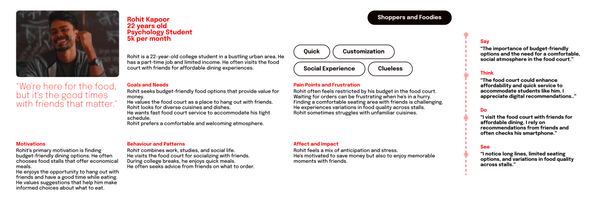
To better understand the diverse users within the dynamic food court space, I have crafted three personas who represent different facets of the food court experience along with their user journey which helped me a lot in the process of ideation and considering the holistic approach of the system:
Maya seeks speed, convenience, and variety. She's motivated by a fast and satisfying meal during her busy day.
Rohit prioritizes friends time and desires a stress-free, enjoyable meal with his loved ones.
Anil is driven by operational efficiency and customer satisfaction, seeking a seamless dining experience.




Amidst the bustling food court environment in malls, customers and food stall staff encounter challenges in efficiently ordering and serving food, attributed to the absence of streamlined Order Coordination and Menu Adaptability, particularly during peak dining hours.
Refined Problem Statement
Ideate
Before diving into the market's current solutions, I began by just entering all of the thoughts that came to me. From the delivery method to the features and aspects that may be included in the solution, I began to scribble everything down in the form of brainstorming.
The suggestions were then divided into three categories: must haves, should haves, and could haves. The must-haves and should-haves aided me in developing the overall solution system, as well as the flow and journey for each stakeholder.
Finally, the user flows, information architecture, and wireframes that would comprise the majority of the solution were designed.


Final Product
DineEase is a comprehensive solution that aims to revolutionize the food court experience through the integration of cutting-edge technology and human-centered design.
By addressing the multiple challenges, it will not only enhance customer satisfaction but also optimize the operational efficiency of food stalls.
This solution takes the form of a multi-faceted digital platform that brings together customers, food stalls, and the mall management, offering a seamless and dynamic dining experience.

What's so special about DineEase?
Convenience
Efficiency
Flexibility
Personalization
DineEase is a win-win for both customers and food stall staff. It provides customers with a more convenient and efficient dining experience, while helping food stall staff to improve their operational efficiency and customer satisfaction.
Inventory stocking
Donation options for leftover food.
Sustainability metrics for food stalls.
(Not considered majorly yet)

Keep each and every feature at the core to make it extremely seamless for the users!
System Architecture

Unified Payment:
-
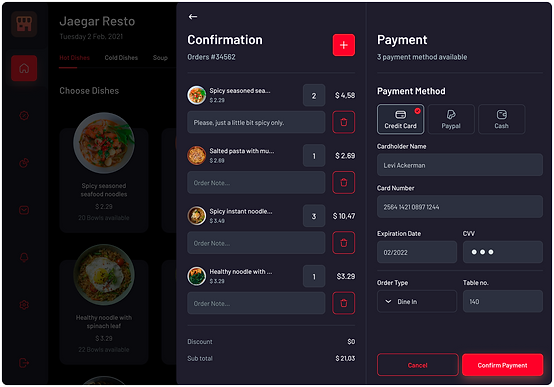
Single Payment Interface: Seamlessly review and pay for orders from multiple stalls.
-
Order Summary: Comprehensive overview of all items for transparency.
-
Diverse Payment Options: Choose from various payment methods for convenience.
UX strategy:
Simplicity and efficiency: Consolidated order view and multiple payment options enhance user experience.
Live Menu and Wait Time:
-
Interactive Menu Boards: Real-time menus with images, descriptions, and availability status.
-
Wait Time Estimation: Informed decision-making based on preparation time.
-
Filtering Options: Personalized browsing experience based on dietary preferences.
UX strategy:
Informed decisions: Real-time information, interactive menus, and filtering options enhance user experience.


Personalized Recommendations: DineEase leverages user data and order history to offer tailored food recommendations, making it easier for customers to discover new dishes or quickly reorder their favorites.
- User Profile Integration: Personalized recommendations based on preferences and order history.
-
AI-driven Suggestions: Convenient suggestions for food items based on past orders.
-
Quick Reorder: Swiftly repeat favorite or frequently ordered items.
UX Strategy:
Enhanced dining experience: Comprehensive order overview, real-time updates, and visual representations reduce uncertainty and improve satisfaction.


Multi-order Tracking: With the ability to track multiple orders in a centralized location, users can conveniently monitor their orders from various stalls, ensuring a smoother and more organized dining experience.


Central Management Dashboard
Central Management Dashboard: Real-time Insights: Performance metrics, peak hours analysis, and popular dishes.
Menu Management: Centralized menu updates and seasonal specials implementation.
Staff Allocation: Efficient distribution of orders among food stall staff.
Customer Engagement: Interactive polls, promotions, and loyalty program management. Crisis Management: Rapid response protocols during emergencies.


Food stall interface
Real-time Order Management: Orders appear in the backend as customers place them, minimizing delays.
Customization Dashboard: Interactive interface for modifying orders based on customer preferences.
Integrated POS System: Streamlined payment processing and accurate order tracking.
Kitchen Display System (KDS): Visual representation of orders for efficient preparation.
Staff Performance Analytics: Insights to improve service speed and order accuracy.
Integrated POS System: Streamlined payment processing and accurate order tracking.
Kitchen Display System (KDS): Visual representation of orders for efficient preparation.
Staff Performance Analytics: Insights to improve service speed and order accuracy.

Metropolis
Epilogy


Watch view integration for notification updates, helping me cater to multiple devices.


Business Model Canvas &
Value Proposition

For Customers
Convenience
Streamlined ordering, personalized recommendations, and order tracking for a hassle-free experience.
Access to multiple menus, customization, dietary information, and allergen alerts.
Variety and Customization
Seamless communication with stall staff and access to loyalty programs and special offers.
Enhanced Interaction
For Food Stall Vendors
Access to a powerful backend system with real-time order management, dietary alerts, and performance analytics.
Streamlined Operations
Integration of POS systems and a kitchen display system, allowing seamless order processing and management.
Increased Efficiency
Interact with customers, promote offers, and receive valuable insights to better tailor their services.
Customer Engagement
For Food Court Management
Real-time insights, efficient staff allocation, and dynamic menu management for data-driven decision-making.
Centralized Oversight
Protocols for rapid response during emergencies to ensure safety and effective management.
Crisis Readiness
Improved service, faster order fulfillment, and an engaging environment, enhancing the overall food court experience.
Enhanced CX
Validation
Ensuring DineEase Effectiveness

Criteria for Testing
Assess the platform's ease of use for both customers and food stall staff.
Usability
Functionality
Ensure all features, from unified payment to personalized recommendations, operate smoothly.
Reliability
Verify the consistency and reliability of real-time information and order tracking.
Performance
Evaluate the speed and responsiveness of the system under varying conditions.
Security
Confirm the security of user data and financial transactions.
Usability Testing
When I started with the process of testing, I developed criteria based on what I really wanted to test in the app. As of now I was just able to test the customer product that I have built due to the availability of the users.
I asked the users to use the app first and made some observations. Then once they got to know what the app was all about, I gave them few scenarios where they had to navigate the application.
Collecting user feedback is crucial for iterative improvements so I used open-ended questions while the user were using the app.
Scenario
Users are asked to place an order, customize it, and track its status.
Task
Observations
- Did users easily find and use the key features?
- Was the customization process intuitive?
- Were users able to efficiently track their orders?
- How satisfied are you with the order tracking and wait time estimates?
- Were there any challenges or confusion during your interaction?
Feedback Collection
- How was your overall experience with using DineEase and what do you think about the idea of it?
- What did you find most helpful in DineEase?

Changes and Iterations
Based on user feedback and testing outcomes, the following changes may be considered:
-
Usability Enhancements: Simplify any complex processes or confusing navigation elements identified during usability testing.
-
Feature Adjustments: Fine-tune features based on user feedback for optimal performance and user satisfaction.
-
Communication Improvements: If users express confusion, consider adding explanatory tooltips or guides to enhance communication.
Project Feedback and Future Scope


Learnings
-
Continuous feedback from users helped to improve the product.
-
Working with different people helped to create a better product.
-
Understanding the needs of the users helped to create a product that they actually want.
Thank you!!!